Video Mastery
Learn how to rank your videos with these top 10 raking tips.
Top 10 Tips to Rank your YouTube videos
If you are not making YouTube Videos in your marketing, then you are losing out big time.
Video is huge right now and will continue to get even bigger. But that brings with it some problems.
How can you ensure that your video gets seen?
This info graphic shows just how complicated it can be. There are a huge number of variables that you need to understand (at least if you go by what that image shows)
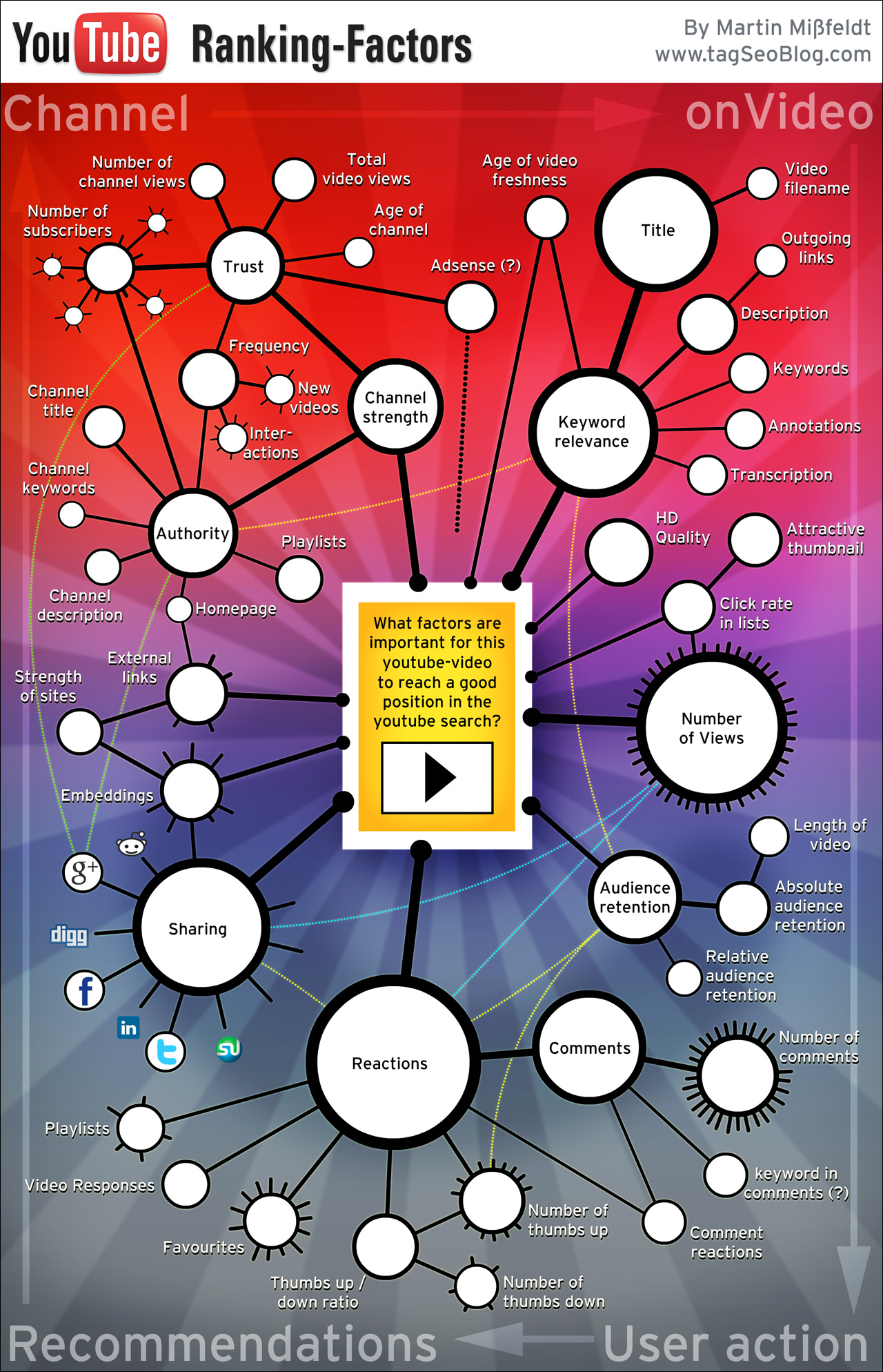
Luckily, there are some simple tips and strategies you can use to ensure you get better rankings and more eyeballs on your videos.
Tip 1. Pimp Out Your YouTube Channel
Treat your channel like a blog. Make sure that you have included some channel art and that it is professional looking. Dimensions for this are: Channel Art. Single 2560 x 1440 px image;; JPG, GIF, BMP or PNG (no animated GIFs).
Maximize the use of the description box. the first 156 characters are key so make the most of them. If you can, include at least 5 primary keywords.
Tip 2. Create a channel Trailer
The purpose of this is to encourage folk to either subscribe to your channel or opt in to your list. That choice is yours. But at least have something that visitors will see.
Tip 3. Incoming Link
Run an incoming links campaign for your channel and use your keyword phrase as the anchor text in your links.
Tip 4. File Name
This may seem basic to a lot of old, but it needs to be put in there. Make sure that your video file name is your primary keyword. While it is unknown if this really had any effect, it will still help you with the organization of your videos.
Tip 5. Your Video Description
The only real way for Google and YouTube to know what your video is about is to crawl the text and if there is no text, how can they do it? Contrary to popular opinion, you don’t need a 200 plus description. YouTube’s very own user guide states that the first few lines are key.
Tip 6. Include a Custom Thumbnail
Here is a video that explains this in detail…
Tip 7. Share your Video
Share your video on ALL the social networks you have available under the video. Make accounts for these networks if you have yet to do so. This is easy yet some people are lazy.
Tip 8. RSS Submission
Submit your video RSS to an RSS Feed submitter. This Submitter will do: http://theim.org/onlinersssubmit/
Here’s the link to make your videos into an RSS Feed:
http://gdata.youtube.com/feeds/api/users/ENTER-CHANNEL-USER-NAME-HERE/uploads?orderby=updated&vq=ENTER-VIDEO-TITLE-HERE
Tip 9. Pinging
Ping your URL at the following:
Pingler, Massping, Pingomatic
Tip 10. Have a strategy
When you outsource your seo, make sure you do not do too much at once. Do all the above first, then wait and see. If after 48-72 hours, your video is struggling, you can go to sites such as: seoclerks or fiverr to grab some gigs.
Of course, there are other things you can do, but this should be enough to get you going and moving in the right direction.
For more information, you can click the image below: